

Earthwork & Site Grading Reference
Excavation & Earthwork Volume Calculator: A Field Engineer’s Guide to Cut-Fill Accuracy
How to calculate cut and fill volumes, correct for soil swell and shrinkage, and stop earthwork quantities from blowing past the budget before the first truck rolls.
§01 — The Estimation Problem
Why Getting Earthwork Quantities Wrong Is So Expensive
Most earthwork cost overruns trace back to two mistakes: treating in-ground soil volume as equal to hauled or compacted volume, and forgetting that excavation walls need slope. Both errors are correctable with an excavation and earthwork volume calculator that applies soil-specific swell and shrinkage factors before a single truck is scheduled.
A site superintendent I worked with in Alberta once had a fill estimate come in 28% short, mid-project, on a job that was already committed to a fixed delivery schedule. The design volume looked fine on paper. What it missed was compaction shrinkage on a clay-heavy fill, the kind of gap that shows up as an unplanned $30,000 to $50,000 material order once the trucks are already booked.
That story isn’t unusual. Earthwork is one of the few line items where a rounding error in a formula turns into a five- or six-figure change order weeks later. The volume moved on paper never matches the volume moved in the field unless someone accounts for how soil behaves once it’s disturbed.
This guide walks through the actual math behind cut and fill volume, the swell and shrinkage factors by soil type, equipment and hauling considerations, backfill and compaction requirements, and the slope stability and safety rules that shape a real excavation plan. Where a number needs verification, we point back to the standards bodies and equipment manuals that set it, along with the full Excavation & Earthwork Volume Calculator, which handles polygon plots, unit conversion, and CSV export for documentation.
§02 — Methodology
How Cut, Fill, and Net Earthwork Volume Are Actually Calculated
Cut volume equals excavation area multiplied by average depth, then increased by the soil’s swell factor. Fill volume equals the design fill area multiplied by depth, then increased by the shrinkage factor to account for compaction loss. Net earthwork is fill volume minus cut volume, and it tells you whether the site needs disposal, imported material, or neither.
Step 1: Base Volume for Regular Areas
For a rectangular footprint, the starting formula is simple geometry: length times width times average depth. A footing excavation measuring 22 m long, 14 m wide, and 1.6 m deep gives a raw volume of 492.8 cubic meters, before any soil correction is applied. That number describes the hole, not the truckload.
Step 2: Irregular Plots Use the Shoelace Formula
Real sites rarely come as clean rectangles. For an irregular boundary, surveyors and calculators fall back on the shoelace formula, which derives area directly from a sequence of coordinate points walked around the plot perimeter. Multiply each x-coordinate by the next point’s y-coordinate, subtract the reverse pairing, sum the results, take the absolute value, and halve it. If you haven’t already confirmed the plot’s boundary, Solvebility’s Plot Area & Perimeter Calculator uses the same shoelace method and is worth running first, before the earthwork numbers ever get calculated. Feed the coordinates in from a GPS rover or total station and the math resolves automatically, no manual triangulation required.
Step 3: Add the Slope Correction
Vertical-wall excavation is rare below about 1.5 m of depth, since unsupported soil at that depth becomes a collapse hazard. Sloped or benched walls add volume that a flat length-times-width calculation ignores entirely. A 12% slope allowance, typical for a mid-depth commercial excavation, increases the base area by roughly 12% before the depth multiplication ever happens.
Step 4: Apply Swell and Shrinkage
Most estimators shortcut this step, and it’s the one behind that Alberta-style budget surprise. Soil in its natural, undisturbed state sits compressed under the weight of everything above it. An excavator bucket breaks that structure apart. The particles loosen, air works its way between them, and the volume expands. That’s the swell factor. Run the same soil back through a compactor for fill and the opposite happens: it settles tighter than its loose, hauled state. That’s the shrinkage factor.
Take that 492.8 m³ footing excavation in clay, with a 20% swell factor. Load-out volume becomes 492.8 × 1.20 = 591.4 m³, roughly 100 cubic meters more than the hole itself, which changes both truck count and disposal fees. Run the same logic on the fill side with a 10% shrinkage factor and you’d need 10% more loose material delivered than the compacted design volume calls for.

§03 — Reference Data
Excavation Measurement Tables and Common Soil Swell/Shrinkage Factors
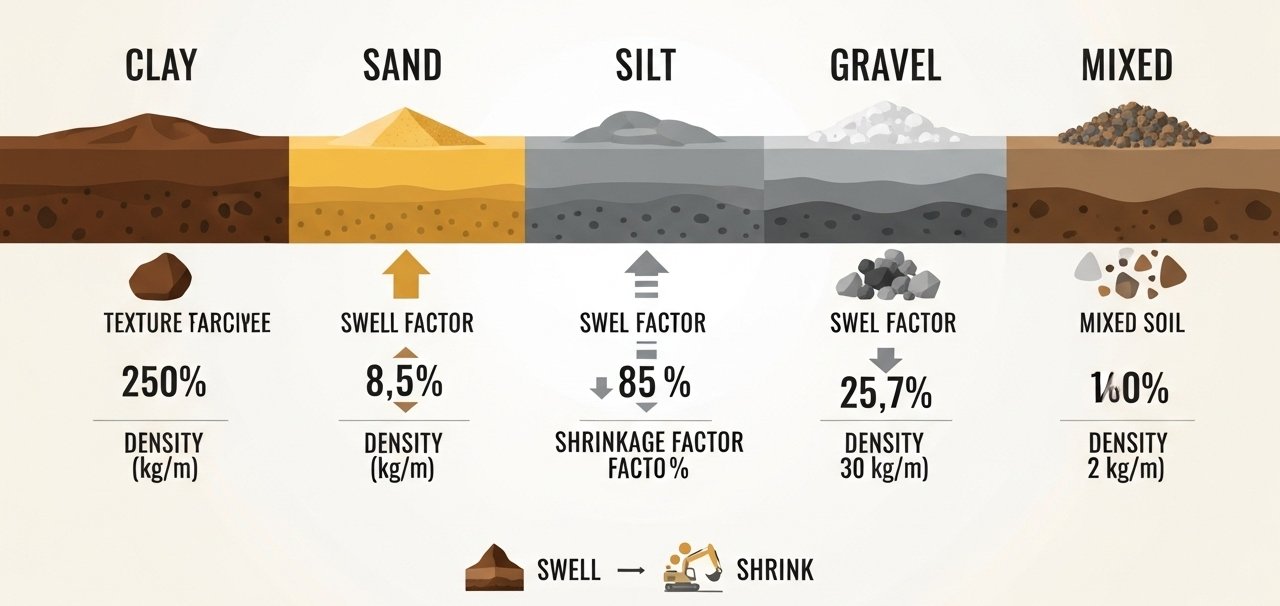
Swell and shrinkage factors vary by soil classification: clay swells roughly 20% and shrinks 10%, sand swells around 12% and shrinks 7%, silt sits near 15% swell and 8% shrinkage, and gravel is the most stable at roughly 8% swell and 5% shrinkage. These are industry averages; site-specific geotechnical testing should override them on large projects.
| Soil Type | Swell Factor | Shrinkage Factor | Bank Density (kg/m³) | Typical Use |
|---|---|---|---|---|
| Clay | 18–25% | −8 to −10% | 1,800 | Compacted structural fill |
| Sand | 10–14% | −6 to −8% | 1,600 | Drainage layers, bedding |
| Silt | 13–17% | −7 to −9% | 1,700 | General fill, moisture-sensitive |
| Gravel | 6–10% | −4 to −6% | 2,000 | Road base, drainage systems |
| Mixed / Common Earth | 9–12% | −5 to −7% | 1,750 | General excavation and fill |
| Rock (blasted) | 50–80% | N/A | 2,400+ | Riprap, sub-base (rarely reused as fine fill) |
Ranges above draw on equipment-performance data published in references such as Solvebility’s excavation soil library and the Caterpillar Performance Handbook. Rock behaves nothing like soil here. It doesn’t loosen the same way once it’s broken up, so contractors price and schedule it as its own line item instead of folding it into general soil swell math.
| From | To | Multiply By | Worked Example |
|---|---|---|---|
| Cubic meters (m³) | Cubic feet (ft³) | 35.3147 | 250 m³ = 8,828.7 ft³ |
| Cubic meters (m³) | Cubic yards (yd³) | 1.30795 | 250 m³ = 326.99 yd³ |
| Cubic yards (yd³) | Cubic meters (m³) | 0.76456 | 300 yd³ = 229.37 m³ |
| Cubic feet (ft³) | Cubic meters (m³) | 0.02832 | 5,000 ft³ = 141.58 m³ |
| Square meters (m²) | Square feet (ft²) | 10.7639 | 120 m² = 1,291.7 ft² |
Common Measurement Mistakes Worth Double-Checking
- Blended unit systems: mixing feet and meters mid-calculation is the single fastest way to get a quantity that’s off by a factor of three.
- Flat average depth on sloped ground: a single average depth across an uneven site smooths over real variation; split the area into zones with similar depth and sum them.
- Skipping the slope allowance: ignoring side-slope volume routinely understates total earthwork by 10–20%.
- Applying shrinkage instead of swell to cut volume: an easy transposition error with an outsized effect on haul truck counts.
§04 — Field Operations
Excavation Methods, Equipment Selection, and Hauling Considerations
Equipment selection follows volume and access, not the other way around. Small residential jobs under roughly 100 m³ suit skid steers and mini-excavators; mid-size grading works well with standard excavators and articulated dump trucks; anything above 10,000 m³ typically justifies larger hydraulic excavators paired with dedicated haul fleets.
Matching Equipment to Volume and Access
A backyard basement excavation and a commercial pad for a distribution center are both “earthwork,” but they call for entirely different fleets. Confined urban lots with tight access often favor compact equipment even on moderately sized jobs, simply because a full-size excavator can’t maneuver through a residential gate. Once a site opens up, larger buckets and higher-capacity trucks bring the per-cubic-meter cost down through sheer productivity. Once the footings are open and depth-checked, the next planning step is usually the pour itself; Solvebility’s Concrete Mix Design Calculator handles cement, sand, and aggregate proportions for that stage.
| Volume Range | Typical Equipment | Notes |
|---|---|---|
| Under 100 m³ | Mini-excavator, skid steer, single dump truck | Common for residential footings, utility trenches |
| 100–2,000 m³ | Mid-size excavator (20–35t), articulated hauler | Standard for small commercial pads and driveways |
| 2,000–10,000 m³ | Large excavator, dozer for spreading, multi-truck fleet | Grading, subdivision roads, retention ponds |
| Over 10,000 m³ | Excavator fleet, scrapers, dedicated haul route | Large commercial or highway-scale grading |
Hauling Math That Actually Matters
Once you know the volume, hauling comes down to division: total adjusted cut volume divided by truck bed capacity gives the load count, and load count divided by cycle time gives the schedule. Trucks haul the loose, swelled volume, not the bank volume the excavation plan was drawn against, so this is where swell matters most in practice. Underestimate it and the truck count on the schedule falls short by roughly the same percentage.
Choosing Between Cut-Fill Balance and Import/Export
When a site’s cut and fill volumes land close to each other, a small shift in finished grade can eliminate hauling material on or off site entirely. Worth chasing early, in the design phase, since import and export costs compound fast once trucking distance and tipping fees enter the picture. Test a few grade adjustments in the full earthwork calculator before the design locks in. A few centimeters of finished floor elevation can close a five-figure material gap.
§05 — Material Behavior
Soil Types, Compaction, Moisture Content, and Backfilling Requirements
Backfill performance depends on soil type, moisture content, and compaction effort together, not any single factor alone. Most structural fill specifications call for 90–95% of maximum dry density under a Standard or Modified Proctor test, and moisture within a few percentage points of optimum, since soil that’s too wet or too dry won’t compact to spec no matter how much effort goes into it.
Why Moisture Content Controls Compaction Outcomes
Every soil has an optimum moisture content where compaction achieves the highest density for a given effort. Too dry, and particles resist sliding into a tight arrangement. Too wet, and water fills the pore space that soil particles need to occupy, so no amount of rolling drives the density up. Geotechnical labs establish this relationship using Proctor compaction tests, standardized under ASTM D698 (Standard Proctor) and ASTM D1557 (Modified Proctor), and field crews check against it with a nuclear density gauge or sand-cone test.
Backfill Requirements by Application
- Structural fill under foundations: engineered material compacted in lifts, typically 95%+ of maximum dry density, with each lift verified before the next is placed.
- Utility trench backfill: select material free of large rock or debris near the pipe, compacted in thin lifts to avoid point loads on buried utilities.
- General grading fill: looser compaction tolerance, often 90%, acceptable for landscaped areas without structural loads.
- Retaining wall backfill: free-draining granular material, since trapped water behind a wall is a leading cause of retaining structure failure. If masonry retaining or boundary walls are also on the scope, Solvebility’s Brick & Block Masonry Calculator covers unit and mortar quantities separately.
Reading the Soil Comparison at a Glance
Clay holds together well when dry, but it swells the most on excavation and shrinks the most under compaction. It’s workable as structural fill, just only when moisture is tightly managed. Sand and gravel behave far more predictably, and that consistency is why both dominate drainage layers and road base specs, even without clay’s cohesion.
§06 — Risk & Compliance
Drainage, Slope Stability, and Safety Considerations in Excavation Projects
Slope stability, drainage control, and trench safety are not separate from volume calculation, they change it. Sloped or benched walls required for worker protection add measurable volume, and drainage design determines whether that slope holds through a wet season or fails.
Slope Stability and Excavation Wall Design
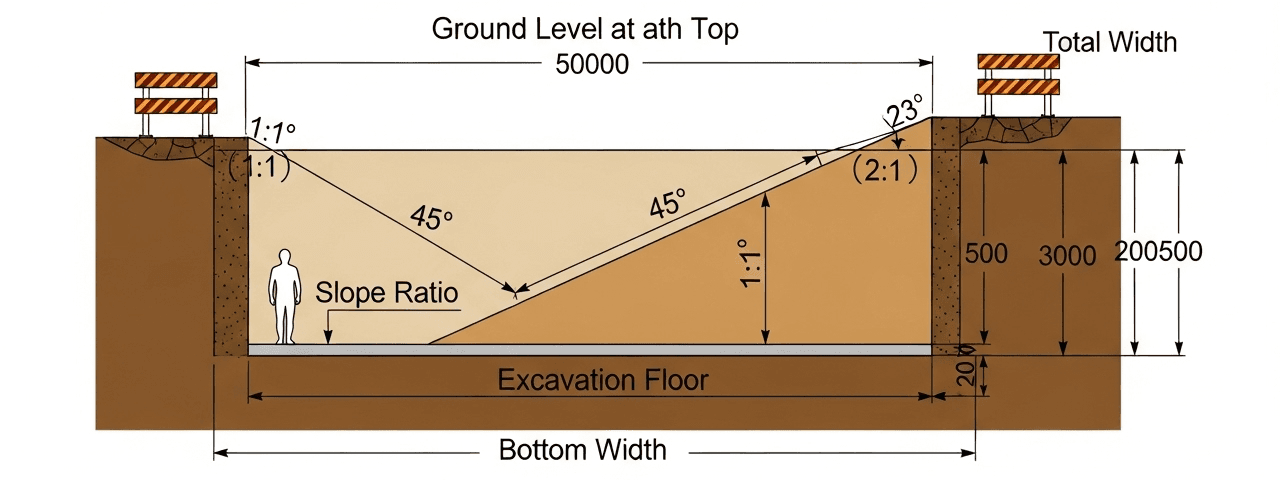
Excavation walls steeper than a soil’s natural angle of repose are a collapse risk, and that risk only grows with depth. In the United States, OSHA 29 CFR 1926 Subpart P is the governing standard: it sets maximum allowable slopes by soil classification and requires a protective system, sloping, shoring, or shielding, on any excavation deeper than 1.5 m (5 ft). Canada, Australia, and the EU each run their own occupational safety frameworks with broadly similar depth thresholds. Local regulations should still be the final word.
Drainage Control During and After Excavation
Standing water in an open excavation causes two problems at once. It softens the base soil and weakens bearing capacity, and it saturates the slope face, one of the most common triggers for a slope failure. Perimeter swales, sump pits with pumps, and temporary grading that routes runoff away from the cut are standard practice on any excavation left open past a single shift.
Environmental and Erosion Controls
Exposed soil erodes fast, so most jurisdictions require an erosion and sediment control plan before ground breaks. Silt fencing, sediment basins, and stabilized construction entrances are the usual tools. Topsoil stripped ahead of excavation deserves its own stockpile too. Bury it in the general spoil pile and you’ve lost the material that final landscaping and site restoration actually depend on.
How Safety Requirements Feed Back Into Volume
Every protective measure above turns into a number the calculator needs: a required slope ratio increases excavated area, a bench width adds a step to the cross-section, shoring cuts the effective excavation footprint but adds working space at the base. Build safety into the volume calculation from the start, not after the quantities are already locked in.
§07 — Interactive Reference
Cut & Fill Hauling Estimator
This lightweight companion tool estimates truckloads and material delivery needs once you already know your excavation dimensions. It’s built to sit alongside, not replace, the full Excavation & Earthwork Volume Calculator, which handles polygon plots, slope corrections, and PDF/CSV export for formal documentation. Use this one for a quick field check on how many truckloads a cut or fill quantity will actually take.
Excavation Hauling & Load Estimator
Enter your excavation dimensions and soil type to get swell/shrink-adjusted volume, truckloads required, and a net earthwork check.
Factors auto-fill on selection. Override below if you have site-specific test data.
Results
This estimator is a planning aid for preliminary truck scheduling and material checks. For polygon plots, PDF reporting, and bid-ready documentation, use the full Excavation & Earthwork Volume Calculator. Always verify final quantities against surveyed site data before committing to a contract.
§08 — Frequently Asked
Excavation Volume Calculator: Frequently Asked Questions
Cut volume is the soil removed from areas above the finished grade, such as a basement or building pad. Fill volume is the material placed to raise areas below finished grade. Net earthwork is the difference between the two, and it tells you whether the site needs disposal, imported material, or neither.
Undisturbed soil is compacted by the weight of everything above it. Once you dig it up, the particles loosen and trap more air, so the same mass occupies more volume. This is the swell factor, and it typically ranges from 8% for gravel to 25% or more for heavy clay.
A careful manual or spreadsheet calculation is usually within 5–10% of actual quantities, which is fine for early budgeting. Contracts, bid submissions, and any project over roughly 1,000 cubic meters should be checked against a licensed surveyor’s topographic data before quantities are finalized.
Use published averages by soil classification: roughly 20% swell and 10% shrinkage for clay, 12% swell and 7% shrinkage for sand, 15% swell and 8% shrinkage for silt, and 8% swell and 5% shrinkage for gravel. These figures are a starting point, not a substitute for geotechnical testing on large or high-value projects.
Standard soil excavation typically runs $10–30 per cubic meter in North America, depending on depth, access, and soil type. Rock excavation is far more expensive, often $50–150 per cubic meter, because it requires specialized breaking or blasting equipment.
Yes. Sloped or benched excavation walls, required for worker safety below about 1.5 m (5 ft), add volume that a simple length-times-width-times-depth formula misses. Skipping the slope correction is one of the most common reasons field quantities exceed the original estimate by 10–20%.
Use a calculator for concept budgets, feasibility checks, and preliminary bids. Bring in a licensed surveyor or geotechnical engineer once the project moves toward a signed contract, involves irregular topography, or carries an earthwork cost above roughly $50,000, where a small percentage error translates into real money.
Closing Notes
Best Practices for Accurate Earthwork Quantities
Accurate cut and fill numbers come from stacking several small disciplines, not one clever formula. Measure with consistent units. Apply swell to cut and shrinkage to fill, never the other way around. Correct for slope before you multiply by depth. And once a project crosses into serious money, pull soil factors from the actual site, not from a default table.
None of that replaces surveying. The estimator above, and the full Excavation & Earthwork Volume Calculator it complements, both produce planning-grade numbers. Anything headed toward a signed contract still needs a licensed surveyor’s topographic data, and where soil behavior is uncertain, a geotechnical engineer’s sign-off. That’s what separates a good estimate from a defensible one. If the excavation feeds into a structural foundation, it’s worth checking bearing loads early too, Solvebility’s Column Load Calculator handles factored axial capacity for the columns that foundation will eventually carry.
Run Your Own Numbers Before You Bid
Use the full polygon-capable Excavation & Earthwork Volume Calculator for irregular plots, unit conversion, and exportable project documentation.
Open the Calculator →Standards Referenced
Earthwork & Geotechnical Reference Standards
- OSHA 29 CFR 1926, Subpart PExcavation and trenching safety, protective systems, and maximum allowable slope by soil type.
- ASTM D698 / D1557Standard and Modified Proctor compaction test methods for moisture-density relationships.
- US Army Corps of Engineers — EM 1110-2-2300Engineering manual for earthwork, grading, and embankment construction.
- Caterpillar Performance HandbookSoil volume change, swell/shrink factors, and equipment production data.
- ASCEStandards and practice guidance for earthwork volume estimation and grading design.
- Solvebility Excavation & Earthwork Volume CalculatorFull calculator with polygon support, soil adjustments, and export tools — solvebility.com.