Solar Net Metering Financial Calculator

Generate a professional PDF report (25-year projections, charts, and summary)

Inputs

Results

Monthly net credit
Exported vs Imported (kWh)
Annual impact (year 1)
Annual generation
Payback period
25yr NPV / IRR

Energy balance (monthly)

25-year cash flow (projected)

25-Year Financial Projection

YearGeneration (kWh)Consumption (kWh)Exported (kWh)Imported (kWh)Year NetCumulative Cash

Optimization hints

  • Run the calculation to see automated hints.

Solar Net Metering Financial Calculator – Complete Guide to Maximize Your Solar Savings

Discover how the Solar Net Metering Financial Calculator helps you analyze 25-year ROI, payback periods, and savings. Free tool with PDF reports for homeowners worldwide.

Why You Need a Solar Net Metering Calculator Before Installing Panels

Here's the thing—installing solar panels is one of the biggest investments you'll make for your home. But how do you know if it's actually worth it?

Most homeowners dive into solar without understanding the real numbers. They hear about "savings" and "going green," but can't answer basic questions like: When will I break even? What's my actual return on investment? How much will I save over 25 years?

That's where a Solar Net Metering Financial Calculator becomes your best friend.

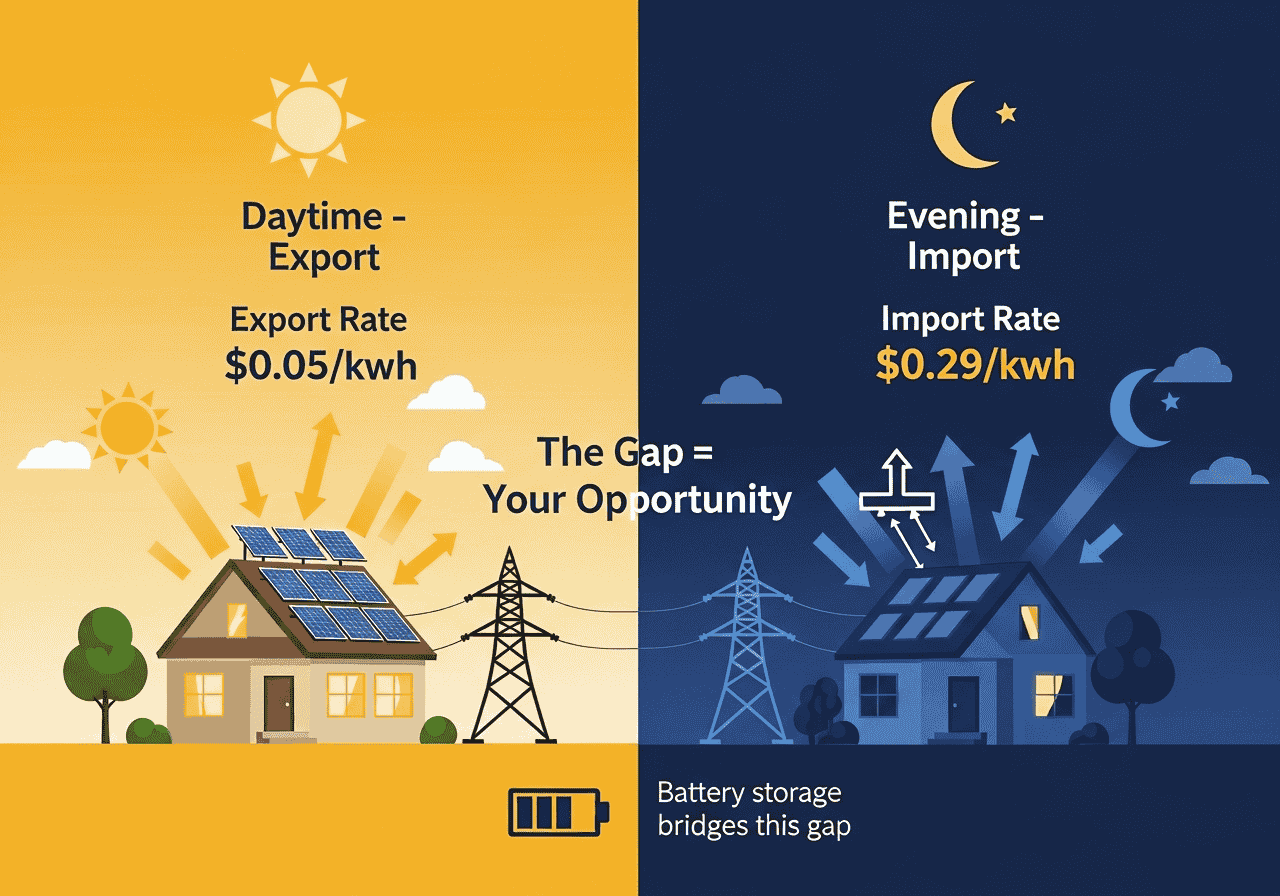
Net metering is the system that credits you for excess solar energy you send back to the grid. In California, you might get $0.05 per kWh exported but pay $0.29 per kWh imported. In Australia, it could be $0.07 vs $0.28. These numbers make or break your solar investment.

This calculator gives you a crystal-clear picture of your financial future with solar. It projects 25 years of savings, accounts for panel degradation, electricity price increases, and shows you exactly when you'll recover your investment.

You know what? The difference between a smart solar investment and an expensive mistake often comes down to running the numbers first.

Table of Contents
{{brizy_dc_image_alt imageSrc=

What is Solar Net Metering and Why It Matters for Your Wallet

Net metering is a billing arrangement where your utility company credits you for surplus electricity your solar panels generate. When your panels produce more power than you use (typically midday), that excess flows to the grid. Your meter literally runs backward.

But here's the catch: export rates (what utilities pay you) are almost always lower than import rates (what you pay them). Sometimes dramatically lower.

Real-world example

In Texas, you might export at $0.03/kWh but import at $0.14/kWh. That 4.6x difference means self-consumption (using your own solar power directly) is worth way more than exporting.

This is why accurate financial modeling matters. A 5kW system that generates 900 kWh monthly but only consumes 800 kWh looks great on paper—but the financial reality depends entirely on those rate differences.

What the calculator provides

The Solar Net Metering Financial Calculator handles these complex calculations automatically, showing you:

  • Monthly net credits (or costs)
  • Annual savings adjusted for degradation
  • 25-year cumulative cash flow
  • Payback period and NPV (Net Present Value)
  • IRR (Internal Rate of Return)


{{brizy_dc_image_alt imageSrc=

How the Solar Net Metering Financial Calculator Works – Under the Hood

Let's break down the sophisticated calculations happening behind the scenes.

Core Calculation Framework

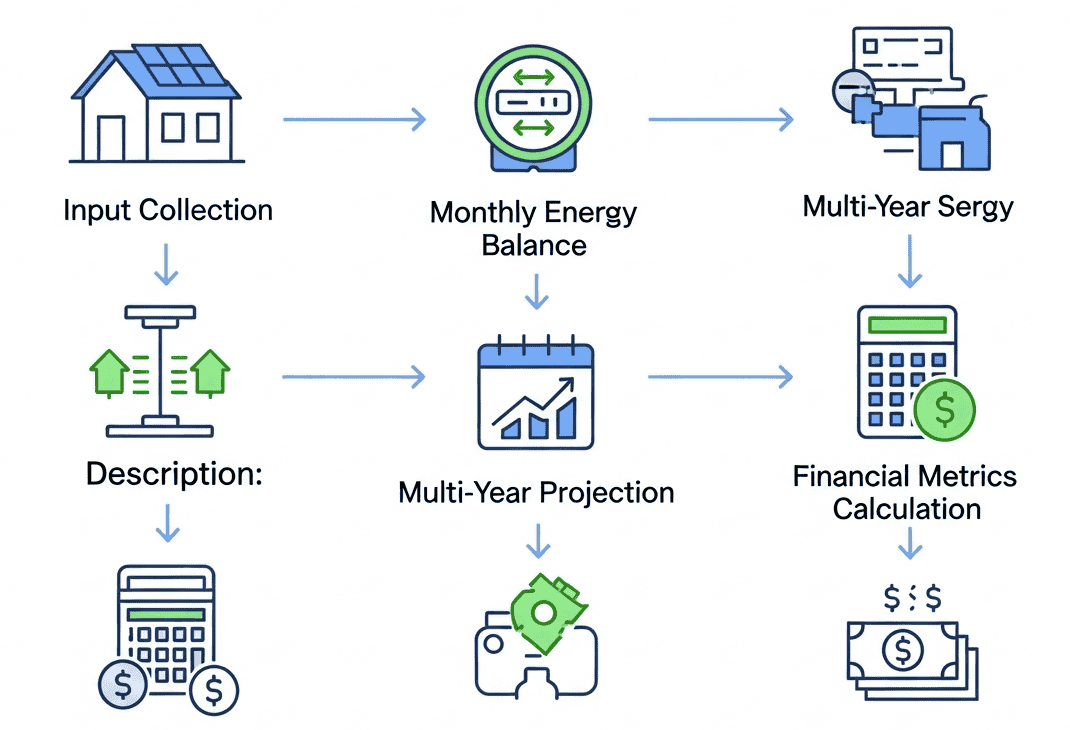
The calculator uses three main computational engines:

1. Monthly Energy Balance Model

For each month, the calculator determines:

  • Exported Energy = MAX(0, Generation - Consumption)
  • Imported Energy = MAX(0, Consumption - Generation)
  • Monthly Net Credit = (Exported × Export Rate) - (Imported × Import Rate)

If you use the 12-month profile feature, it applies seasonal multipliers to reflect winter/summer variations.


2. Multi-Year Projection Engine

For years 1-25, the calculator applies compound factors:

Generation Degradation Factor

Formula: (1 - Degradation%/100)^(Year-1)

  • Standard solar panels degrade 0.5-0.8% annually
  • Year 10 panels at 0.5% degradation = 95.1% of original output


Tariff Escalation Factor

Formula: (1 + Escalation%/100)^(Year-1)

  • Electricity prices historically increase 2-4% yearly
  • This compounds significantly over 25 years


Year Net Savings

Formula: Base Year Net × Degradation Factor × Tariff Factor


3. Financial Metrics Calculator
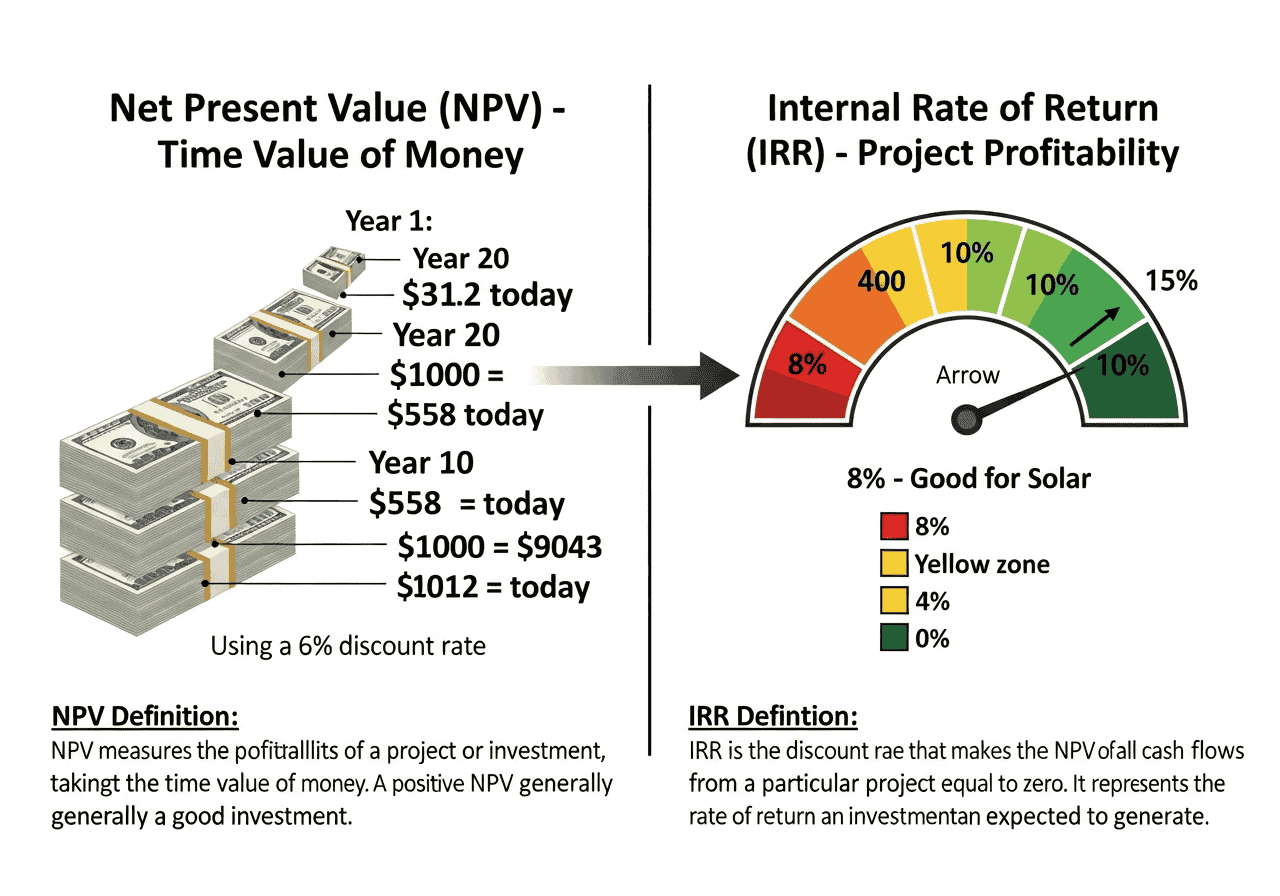
Net Present Value (NPV)
NPV = Σ[Cashflow_t / (1 + Discount Rate)^t] for t=0 to 25

This accounts for the time value of money. A dollar saved in year 20 is worth less than today.

Internal Rate of Return (IRR)

The discount rate where NPV = 0. Calculated using Newton-Raphson numerical method with fallback to bisection for stability.

Payback Period

The year where cumulative cash flow turns positive (total savings exceed initial investment).

Regional Preset Intelligence

The calculator includes 23+ regional presets covering:

  • United States (California, Texas, Florida, New York)
  • Canada (Ontario)
  • Australia (NSW, Queensland)
  • Europe (Germany, UK, Spain, Italy, France, Netherlands, Sweden)
  • Asia (India, Japan, Singapore, Thailand, Philippines, Pakistan)
  • South America (Brazil, Mexico)
  • Africa (South Africa)

Each preset auto-populates typical export/import rates, currency codes, and locale formatting.

Advanced Features Explained

System Cost Calculation
  • Option 1: Size (kW) × Cost per kW ($/kW)
  • Option 2: Enter total system cost manually
  • Useful for comparing quotes or including batteries


12-Month Profile

Instead of assuming identical monthly generation, you can input seasonal multipliers (e.g., 1.1 for summer, 0.85 for winter). The calculator normalizes these to maintain your annual average while reflecting seasonal patterns.

Scenario Management

Save multiple configurations (different system sizes, locations, financing) and compare side-by-side. All scenarios stored in browser localStorage.


{{brizy_dc_image_alt imageSrc=

Step-by-Step: Using the Calculator for Maximum Accuracy

Step 1: Select Your Region or Go Custom

Start by choosing your region from the dropdown. This automatically populates typical rates for your area.

Pro tip: Even if you select a preset, verify the rates with your actual utility bill. Regional presets are averages—your specific tariff might differ.

For "Custom" region, you'll manually enter export/import rates and can set currency symbols.

Step 2: Input Your System Specifications

System Size (kW)

Check your solar quote or inverter capacity. Typical residential: 3-10 kW.

Cost Calculation
  • Using Cost per kW: Enter average $/kW from quotes (typically $1,000-$2,500/kW in US after incentives)
  • Manual Total Cost: Include batteries, installation, permits minus tax credits


Monthly Generation

Your installer provides this, or use tools like PVWatts. Varies by location, roof angle, shading.

Monthly Consumption

Check 12 months of utility bills, calculate average.

Step 3: Set Financial Assumptions

Degradation Rate

0.5% is standard for Tier 1 panels. Budget panels may degrade faster (0.7-1.0%).

Escalation Rate

Historical US average is 2-3%. California closer to 3-4%. Conservative estimate: 2.5%.

Discount Rate

Your opportunity cost of capital. If you'd otherwise earn 6% investing that money, use 6%. Higher rate = more conservative analysis.

Step 4: Optional - Configure 12-Month Profile

Click "Edit profile" to input seasonal multipliers. Example for Northern hemisphere:

  • Winter (Dec-Feb): 0.85-0.9
  • Spring (Mar-May): 0.95-1.0
  • Summer (Jun-Aug): 1.05-1.1
  • Fall (Sep-Nov): 0.9-1.0


The calculator normalizes these automatically.

Step 5: Calculate and Review Results

Hit "Calculate" to generate:

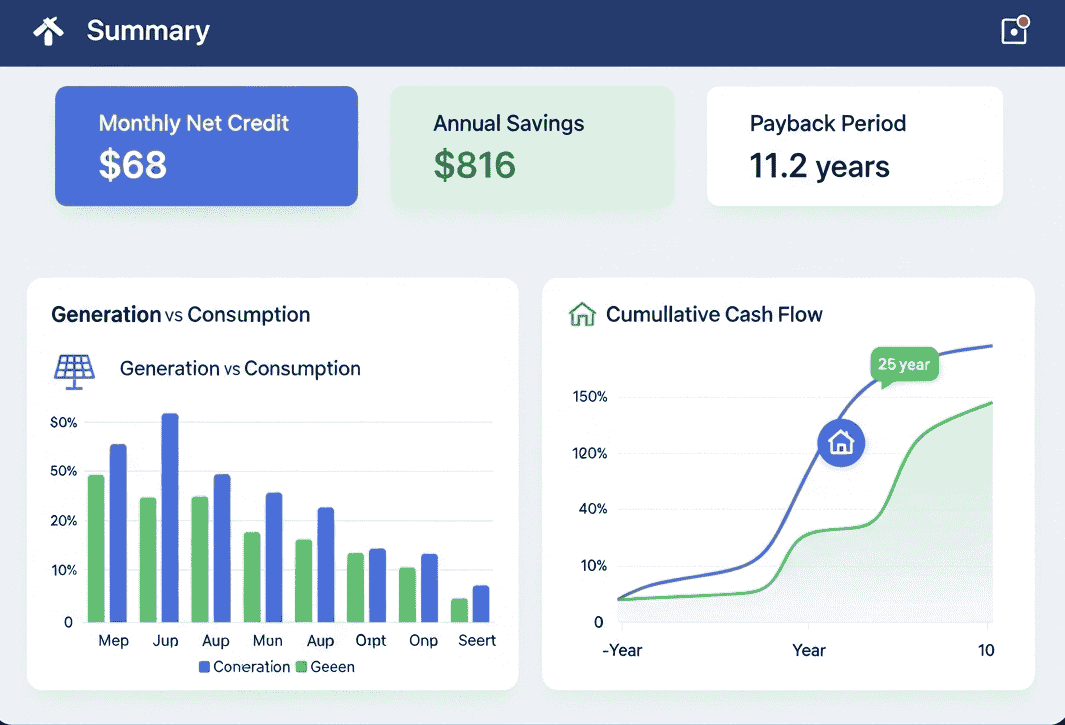
  • Key Metrics Dashboard: Monthly net credit, annual savings, payback period
  • Energy Balance Chart: Visual comparison of generation vs consumption by month
  • 25-Year Cash Flow Chart: See when you break even and cumulative savings
  • Detailed Projection Table: Year-by-year breakdown with exported/imported kWh and cumulative cash position

YearGeneration (kWh)Consumption (kWh)Exported (kWh)Imported (kWh)Year Net SavingsCumulative Cash Flow
0-$6,000-$6,000
110,8009,6001,2000+$48-$5,952
210,7469,6001,1460+$49-$5,903
259,5069,600094+$77+$8,245

Step 6: Download Professional PDF Report

Generate a comprehensive report including:

  • Executive summary with key metrics
  • Visual charts (energy balance, cash flow)
  • Complete 25-year projection table
  • Timestamped for your records

Perfect for comparing installer quotes or sharing with family.

Understanding Your Results: What the Numbers Really Mean

Monthly Net Credit

Positive number?

You're a net exporter—sending more value to the grid than importing. Depending on rates, this might not be optimal. Consider:

  • Adding battery storage for self-consumption
  • Running high-energy appliances during peak solar hours
  • Sizing down your system if consistently over-producing


Negative number?

You're still importing more than exporting. Could indicate:

  • System undersized for consumption
  • Need to shift usage to daytime
  • Excellent self-consumption (actually desirable in most markets)


{{brizy_dc_image_alt imageSrc=

Payback Period

Under 7 years

Excellent investment. Most markets with good incentives.

7-12 years

Good investment. Typical for moderate solar resources or average rates.

Over 12 years

Marginal. Panel warranties are 25 years, so you'll see profit, but consider:

  • Are there better uses for capital?
  • Will you stay in the home long enough?
  • Are incentives/rebates available?
Over 15 years or "N/A"

Reconsider. Solar might not make financial sense in your situation unless:

  • Rates expected to increase dramatically
  • You value environmental benefits highly
  • Off-grid necessity


NPV (Net Present Value)

Positive NPV

Investment adds value above your discount rate. Generally recommended.

Negative NPV

Investment underperforms your discount rate. You'd earn more elsewhere.

NPV interpretation

  • $10,000+: Strong investment
  • $5,000-$10,000: Solid investment
  • $0-$5,000: Marginal, consider alternatives
  • Negative: Avoid or re-evaluate assumptions


IRR (Internal Rate of Return)

Compare to alternative investments:

  • IRR > 8%: Generally excellent for secured home investment
  • IRR 5-8%: Competitive with conservative investments
  • IRR < 5%: May underperform alternatives

Note: IRR assumes you can reinvest savings at the same rate—treat as optimistic indicator.

Optimization Hints

The calculator provides smart recommendations:

  • "Consider battery storage" if exporting during high-rate periods
  • "Increase self-consumption" if net exporting at low rates
  • "NPV negative" if assumptions don't support installation


Advanced Scenarios: Comparing Options Side-by-Side

Comparing System Sizes

Scenario A

5 kW system, $6,000 cost

Scenario B

8 kW system, $9,600 cost

Run both, save each scenario, compare:

  • Does the larger system's payback remain acceptable?
  • Is the incremental investment ($3,600 more) justified by incremental NPV?


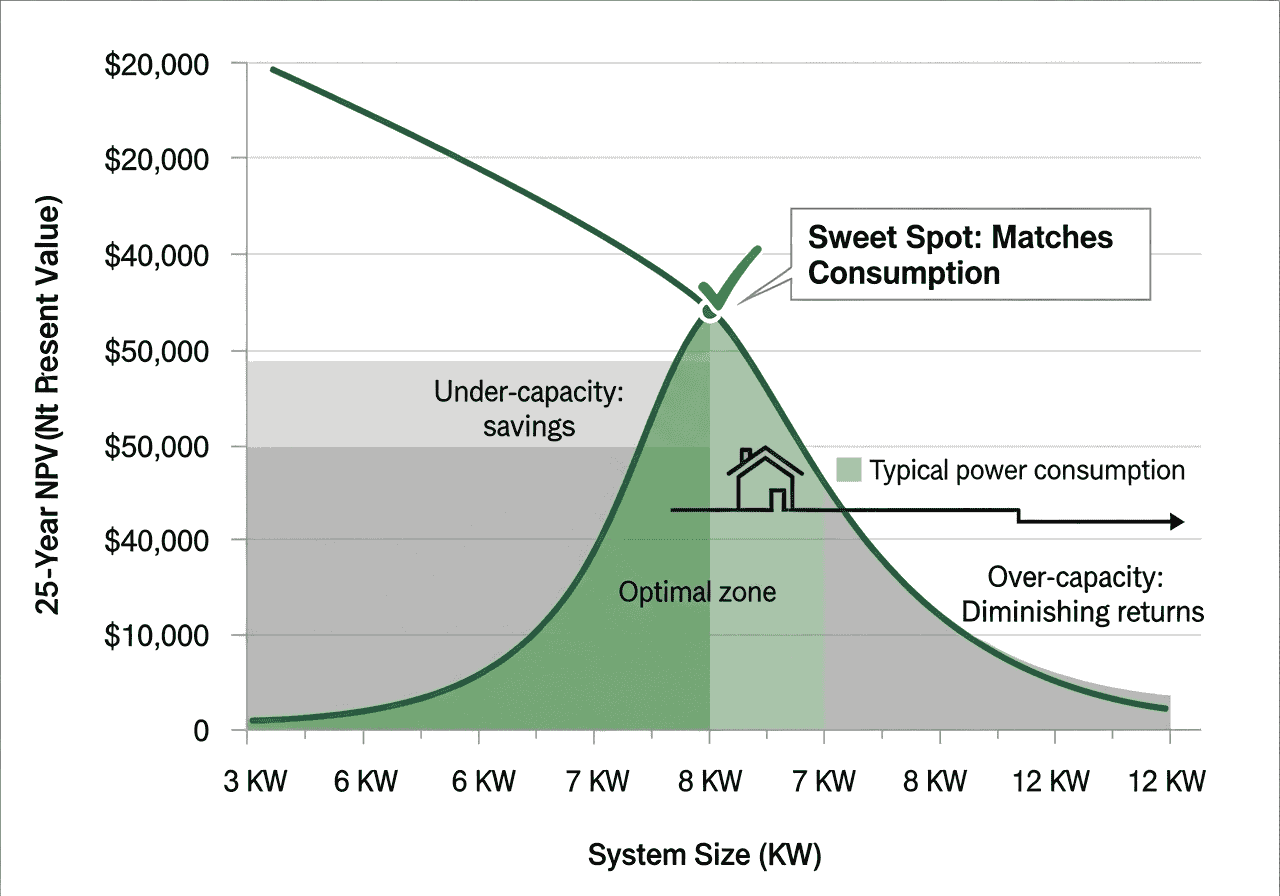
Smart sizing principle: The optimal system size matches your consumption. Over-sizing for exports usually reduces overall ROI due to unfavorable export rates.

{{brizy_dc_image_alt imageSrc=

With vs Without Battery Storage

Baseline

5 kW solar, no battery

Alternative

5 kW solar + 10 kWh battery (add $7,000 to system cost)

Model the battery scenario by:

  • Reducing imported kWh (more self-consumption)
  • Reducing exported kWh (stored instead)
  • Increasing system cost


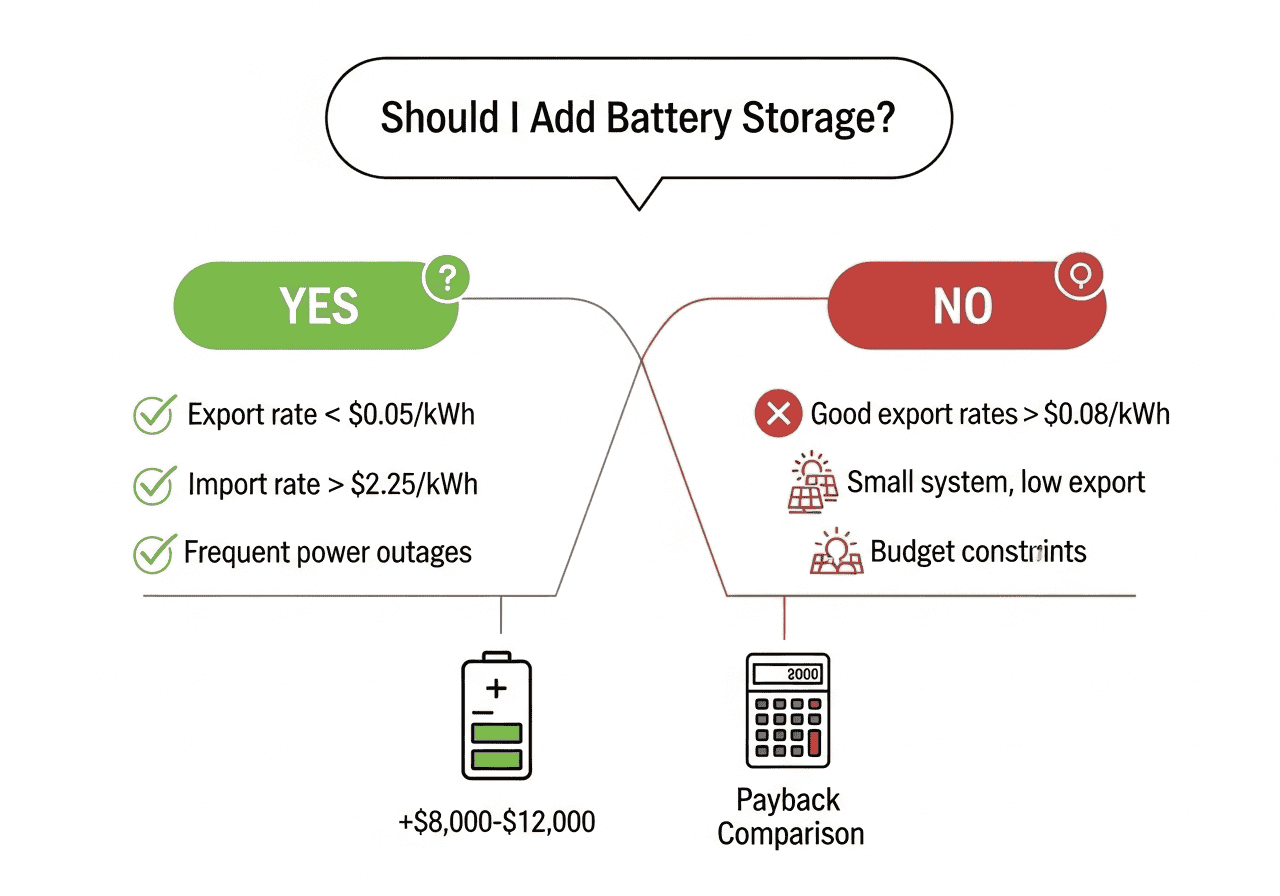
Batteries improve ROI mainly in markets with:
  • Time-of-use rates (expensive evening rates)
  • Very low export rates
  • Frequent outages (value of backup)


Regional Comparison for Relocating

Planning a move? Compare solar economics:

  • California ($0.05 export / $0.29 import)
  • Texas ($0.03 export / $0.14 import)
  • Florida ($0.04 export / $0.13 import)

Same system, different economics. Export-heavy systems suffer more in low-rate markets.

{{brizy_dc_image_alt imageSrc=

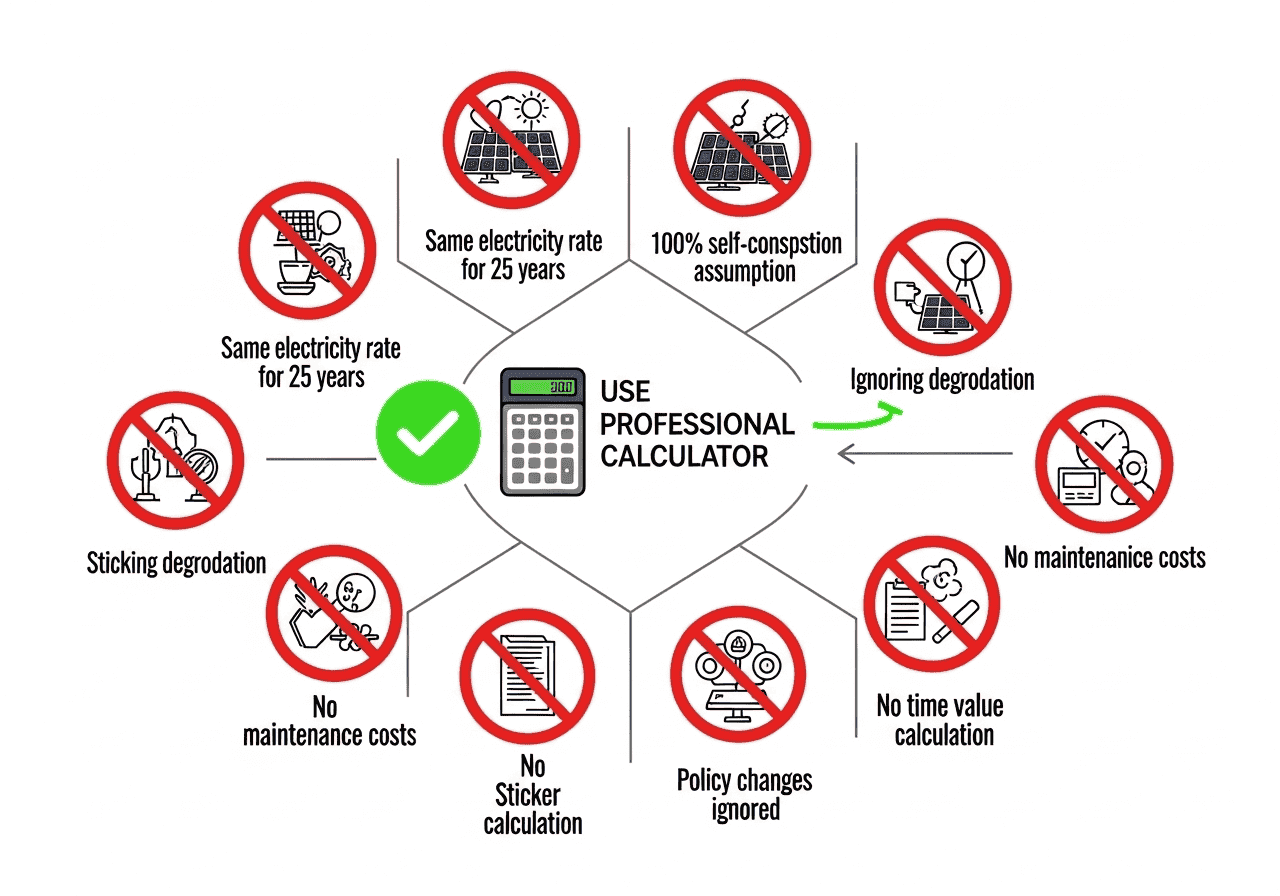
Common Mistakes to Avoid When Analyzing Solar Financials

Mistake 1: Ignoring Degradation

Solar panels lose efficiency over time. Ignoring 0.5% annual degradation overestimates 25-year savings by 12-15%.

Mistake 2: Using Today's Electricity Rates for 25 Years

Rates increase. Using 0% escalation undervalues solar by 30-50% over project lifetime.

Mistake 3: Not Accounting for Time Value of Money

A dollar in 2045 isn't worth a dollar today. Without discounting (NPV calculation), payback periods look artificially better.

Mistake 4: Assuming 100% Self-Consumption

Most homes export 20-40% of solar generation. Assuming you'll use everything on-site inflates savings unless you have battery storage.

Mistake 5: Comparing Only Sticker Price

Cheapest quote isn't always best value. Two $10,000 systems with different warranties, efficiencies, or degradation rates have different 25-year values.

Mistake 6: Forgetting Maintenance and Inverter Replacement

String inverters last 10-15 years. Budget $1,000-$2,500 for replacement around year 12. Microinverters last longer (20-25 years) but cost more upfront.

Mistake 7: Ignoring Policy Changes

Net metering policies can change. California's NEM 3.0 reduced export credits 75%. Model conservative scenarios.

{{brizy_dc_image_alt imageSrc=

Real-World Case Studies: Calculator in Action

Case Study 1: California Homeowner

Situation

6 kW system, $15,000 after tax credit, 850 kWh monthly consumption, 950 kWh monthly generation

Rates

$0.05 export / $0.32 import (NEM 3.0)

Results
  • Monthly net credit: +$68
  • Annual savings (year 1): $816
  • Payback: 11.2 years
  • 25-year NPV: $12,450
  • IRR: 6.8%


Decision

Solid investment. Homeowner added 13.5 kWh battery to improve self-consumption, reducing payback to 9.8 years.

Case Study 2: Texas Homeowner

Situation

8 kW system, $12,800, 1,100 kWh monthly consumption, 1,200 kWh monthly generation

Rates

$0.03 export / $0.14 import

Results
  • Monthly net credit: +$24
  • Annual savings: $288
  • Payback: 24+ years
  • 25-year NPV: -$1,200
  • IRR: 2.1%


Decision

Poor investment at current rates. Homeowner downsized to 6 kW system (closer to consumption), improved payback to 15 years with positive NPV.

Case Study 3: Australian NSW Homeowner

Situation

5 kW system, AUD $6,500, 750 kWh consumption, 900 kWh generation

Rates

$0.07 export / $0.28 import

Results
  • Monthly net credit: +$162 AUD
  • Annual savings: $1,944 AUD
  • Payback: 4.1 years
  • 25-year NPV: $28,340 AUD
  • IRR: 18.2%


Decision

Excellent investment. High import rates and decent export rates make solar extremely attractive.


Frequently Asked Questions

What is a solar net metering financial calculator used for?

A solar net metering financial calculator analyzes the long-term profitability of solar panel installations by modeling 25-year cash flows, payback periods, and return on investment while accounting for electricity rate differences between exported and imported power.

How accurate are the calculator's predictions?

Accuracy depends on input quality. With accurate local rates, realistic degradation assumptions (0.5% for Tier 1 panels), and conservative escalation estimates, predictions typically fall within 15-20% of actual results over 10-15 year timeframes.

Should I include battery storage in my calculations?

Yes, model both scenarios. Batteries add $7,000-$15,000 to system cost but can dramatically improve ROI in markets with low export rates or time-of-use pricing by enabling self-consumption of 80-95% of generation instead of typical 60-70%.

What's a good payback period for solar panels?

Under 8 years is excellent, 8-12 years is good, and over 12 years is marginal. Consider your expected home ownership duration—aim for payback within half your planned occupancy to realize meaningful savings.

How much do solar panels degrade each year?

Tier 1 manufacturers guarantee 90% output at year 10 and 80% at year 25, implying approximately 0.5% annual degradation. Budget panels may degrade 0.7-1.0% annually. Always verify warranty terms before purchase.

What discount rate should I use for NPV calculations?

Use your opportunity cost of capital—typically 5-8% for homeowners. Conservative: 6-7%. If you'd invest elsewhere at 8%, use 8%. Higher rates favor faster-payback investments; lower rates make long-term projects more attractive.

Can electricity rates actually increase 2-3% yearly for 25 years?

Historical US data shows residential electricity rates increased 2.8% annually from 1990-2020. Individual regions vary: California averaged 3.4%, Texas 2.1%. Using 2.5% is reasonable; 3-4% is conservative for high-cost regions.

How do I know if my export and import rates are correct?

Check your utility bill's "rate schedule" or "tariff" section. Net metering rates vary by provider and may change seasonally. Contact your utility for current wholesale export rates and retail import rates including all delivery charges.

Conclusion: Make Data-Driven Solar Decisions in 2025

Solar panels can be one of the smartest investments you make—or an expensive disappointment. The difference comes down to understanding the numbers before you commit.

The Solar Net Metering Financial Calculator eliminates guesswork. With 25-year projections, degradation modeling, and regional rate intelligence, you'll know exactly what you're getting into.

Here's what you've learned:

  • Net metering economics vary dramatically by location—export rates make or break ROI
  • Self-consumption beats exporting in almost every market
  • Proper financial modeling accounts for degradation, escalation, and time value of money
  • System sizing should match consumption, not maximize generation
  • Professional PDF reports help you compare quotes objectively


Take action today: Run your numbers with the Solar Net Metering Financial Calculator. Save multiple scenarios. Compare installers. Make the smart choice backed by data, not sales pitches.

Your future self (and your wallet) will thank you for doing the math first.

Ready to analyze your solar potential? Use the calculator now and download your personalized 25-year financial report.

References & Data Sources

The following trusted resources were used or recommended for validating assumptions, solar resource data, financial models and regulatory information. Replace local placeholders with your country / utility links where indicated.

  • NREL PVWatts — Quick solar production estimator for U.S. & global locations.
  • NREL SAM — Detailed system simulation and financial modelling tool (advanced).
  • PVGIS (EC) — Solar resource maps & irradiation data (excellent for Europe, Africa, Asia).
  • IRENA — Global renewable energy data, statistics and guidance.
  • SEIA — U.S. solar industry stats & resources (useful for US-targeted pages).
  • PVsyst — Professional PV simulation & loss modelling reference (technical users).
  • IEC (Standards) — Module & system standards, certifications and testing references.
  • World Bank — Energy Data — Macro-level energy & development data useful for benchmarking.
  • Google Scholar — Search peer-reviewed papers on degradation, LCOE, and solar economics.
How to use these sources
  1. Use PVWatts / PVGIS for quick production checks and regional presets.
  2. Use SAM / PVsyst for deep-dive simulations and financial validation.
  3. Reference local utility/regulator for exact net-metering/export tariffs and connection rules.
  4. Cite IEA/IRENA/World Bank for market & policy context when writing reports or blog posts.
Scroll to Top