

Start Being Focused.
The Pomodoro timer online is the only productivity tool backed by 30+ years of science, used by millions, and free in your browser right now. Our complete guide + live tool — all in one place.
🚀 Jump to the Free TimerPomodoro Timer online
Why you can’t focus anymore
You opened a task at 9:04 AM. You meant to spend two solid hours on it.
Then a Slack message. A “quick” email. A news check. By noon, you’d worked on it for maybe 23 minutes, and the task was still there, unmoved.
You’re not broken or undisciplined. You’re living inside an attention economy engineered to fragment your focus 200 times a day, and you’re trying to win a concentration war with no weapon.
A Pomodoro timer online is that weapon. Free, in your browser right now (scroll up to try it), 60 seconds to learn. And there’s solid neuroscience explaining exactly why it works when everything else fails.
The goal is to manage attention. The Pomodoro technique is the most elegant tool ever built for that job.
— Adapted from Cal Newport, Deep Work
The surprising origin of the Pomodoro technique
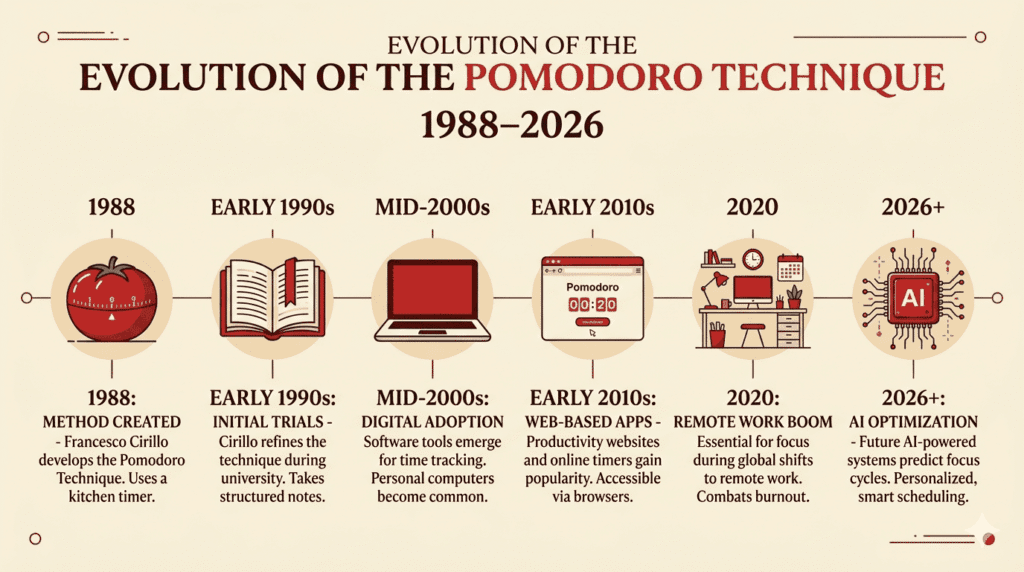
It is 1988. Francesco Cirillo, an Italian university student is sitting in his Rome apartment staring at his coursework and doing absolutely nothing productive.
He picked up a tomato shaped kitchen timer, which is called a pomodoro in Italian. He said to himself that he would work for just ten minutes without any breaks. He did not want to work for two hours, ten minutes.
This actually worked for Francesco Cirillo. He kept working on this method. After some years he found out that twenty five minutes is the best amount of time to work without a break. By the 2000s teams that make software were using the Pomodoro method. Today the Pomodoro timer is used by hundreds of millions of people every day when they are online and the best Pomodoro timer is the one that you just used.
What happens in your brain during a Pomodoro
Most articles about productivity do not mention this. They explain what the technique is, but not how it works in our body. Knowing this helps you use the timer better.
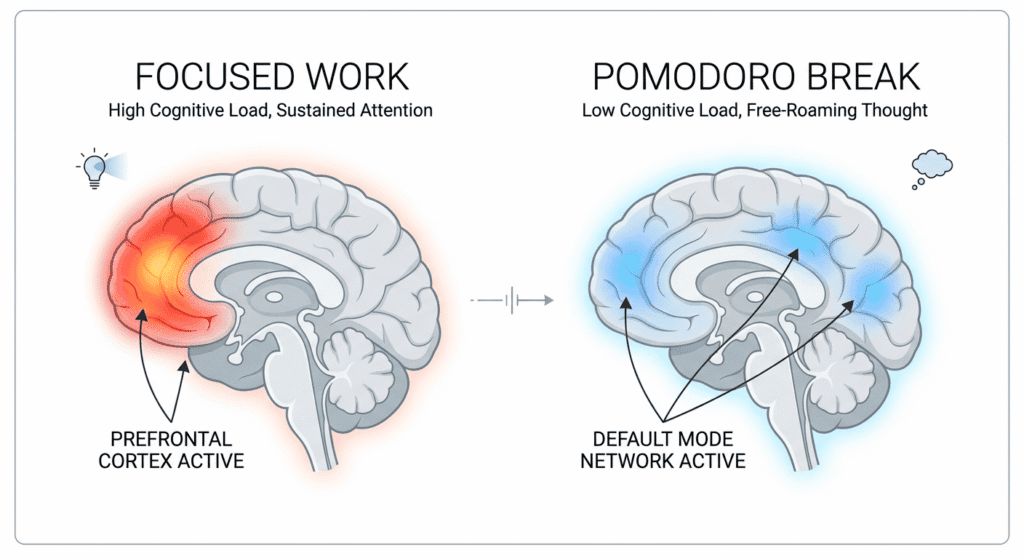
The prefrontal cortex and the cost of thinking
Your prefrontal cortex handles thinking that needs focus. It uses a lot of energy burning glucose, per minute than almost any other part of the brain when you are using it. This is why doing work for 2 hours really tires you out: your brain has used up all its fuel.
The Pomodoro technique makes you rest before you get too tired. A short break every 25 minutes lets your prefrontal cortex get fuel get rid of waste and reset. Your next work session starts feeling fresher.
🔬 Neuroscience corner
A 2011 study by Ariga and Lleras at the University of Illinois found that brief mental breaks dramatically improve focus across long tasks. Sustained attention causes the brain to habituate and stop registering the task as important. Brief breaks reset that habituation.
The countdown also creates a “deadline effect”: mild time pressure activates goal-pursuit systems without triggering the anxiety that comes from overwhelming or ambiguous tasks.
The default mode network: why breaks produce your best ideas
When you step away during a break, your brain activates the Default Mode Network (DMN), responsible for creative insight, connection-making, and what we call “shower thoughts.”
Many breakthroughs in science, design, and writing happen not during active work but during the rest that follows it. The Pomodoro timer systematically harvests your DMN’s output.
How our Pomodoro timer online works: the complete formula
pomodoro-timer.js — Core Formulas & Logic

// ─── DURATION CALCULATION ────────────────────────────────
workSeconds    = workDuration × 60          // 25×60 = 1500s
shortBreakSecs = breakDuration × 60         // 5×60  = 300s
longBreakSecs  = longBreakDuration × 60     // 15×60 = 900s

// ─── FULL CYCLE ──────────────────────────────────────────
cycleTime = (workSecs + shortBreakSecs) × (interval–1) + workSecs + longBreakSecs
// Default: (1500+300)×3 + 1500+900 = 7800s = 130 min

// ─── PHASE TRANSITION ────────────────────────────────────
when timeLeft === 0:
  sessionCount++
  if (sessionCount % longBreakInterval === 0) → Long Break
  else → Short Break
// After any break ends → new Work session

// ─── PROGRESS RING (Canvas) ──────────────────────────────
progress = (totalDuration – timeLeft) / totalDuration
arcEnd   = -π/2 + 2π × progress
ctx.arc(cx, cy, radius, -π/2, arcEnd)   // Draws color arc

// ─── STREAK ──────────────────────────────────────────────
if (daysDiff > 1)    → streak = 0    // Missed a day
elif (daysDiff === 1) → streak++     // Consecutive day

// ─── DAILY FOCUS ACCUMULATOR ─────────────────────────────
dailyFocusTime += workDuration    // On every work session complete
// Full cycle output → 130 minutes of structured work+rest
Pomodoro duration configurations by work style
Table 1: Session configuration reference. Customize these in the Settings tab of the timer above.
| Profile | Work | Short break | Long break | Interval | Full cycle | Best for |
|---|---|---|---|---|---|---|
| 🍅 Classic Pomodoro | 25 min | 5 min | 15 min | 4× | 130 min | General knowledge work |
| 🧠 Ultradian Sprint | 45 min | 10 min | 20 min | 2× | 130 min | Developers, researchers |
| 📚 Student Mode | 20 min | 5 min | 15 min | 3× | 90 min | Studying, memorization |
| ⚡ ADHD Friendly | 15 min | 5 min | 15 min | 4× | 95 min | Attention challenges |
| ✍️ Creative Flow | 35 min | 7 min | 20 min | 3× | 148 min | Writers, designers |
| 📞 Meeting-Heavy | 20 min | 5 min | 15 min | 4× | 110 min | Managers, consultants |
How to use our Pomodoro timer online: 7-step expert guide
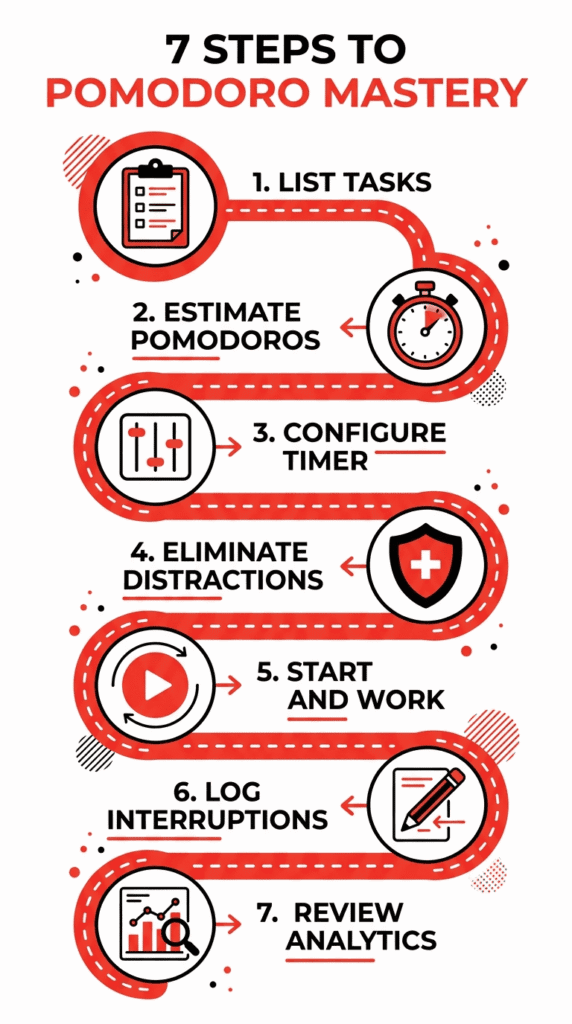
1 Build a complete task inventory before you start
Don’t sit down at the timer and decide what to work on in the moment. That burns cognitive fuel before a single minute of real work.
Spend 5 minutes the evening before writing tomorrow’s complete task list. Open the Tasks tab in the timer above, enter every task, and assign a Pomodoro estimate. When you sit down tomorrow, pick the next item and press Start.
2 Calibrate your timer settings to your natural rhythm
Open the Settings tab. Set your work duration, short break, long break, and long break interval. First time? Use the classic 25/5/15 setup.
Pay attention after 2 weeks: if sessions consistently end just as you’re hitting flow, extend to 35 or 45 minutes.
3 Eliminate distractions, then hit focus mode
Close unneeded tabs. Set your phone to Do Not Disturb. Then click Focus Mode in the timer header for a fullscreen countdown with zero distractions.
Every visual element you remove before a session doubles the quality of your focus within it.
4 Work with full attention, capture wandering thoughts
Start the timer. Work on your task and nothing else. When an intrusive thought surfaces (“I need to reply to that email”), write it down and immediately return.
This “capture and continue” behavior is one of the most underrated Pomodoro skills: it honors the thought without surrendering your session.
5 When the timer rings, actually stop
The ring is not a suggestion. Finish your current sentence and stop. “Just five more minutes” erodes the technique’s power entirely.
Respecting that boundary trains your brain to associate completion with the ring, building real discipline over weeks.
6 Take a real break, not a scroll break
Stand up. Walk. Stretch. Look out a window at something 20+ feet away. Don’t open Twitter, check Instagram, or watch YouTube clips. These stimulate your visual cortex and decision-making systems, the exact things that need rest.
A screen-based break drains you further.
7 End each day with a 5-minute review in analytics
Click the Analytics tab. Review sessions completed, total focus time, and streak. On days when it felt like nothing got done, the numbers often reveal more progress than you perceived.
Five minutes of review provides closure and data for tomorrow’s plan.
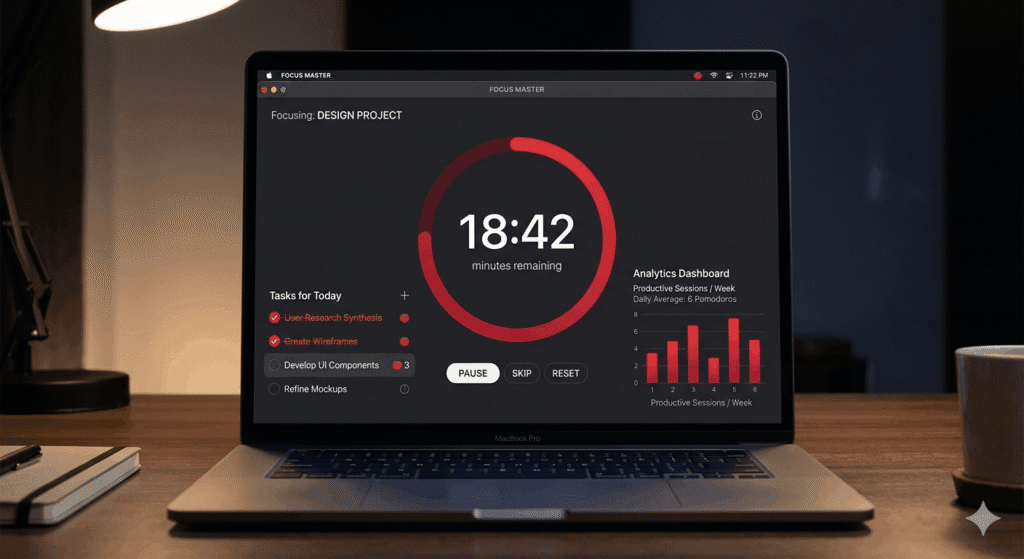
Every feature of our advanced Pomodoro timer online
Table 2: Full feature breakdown. All features accessible in the live timer above.
| Feature | How it works | Why it matters | Power user tip |
|---|---|---|---|
| 🍅 Core timer | Canvas countdown with phase auto-switching | Visual progress triggers motivation to maintain focus | Watch the ring, not the numbers |
| 📋 Task manager | Add, complete, delete tasks with timestamps | Ties time to real output, prevents vague busyness | Never add more than 8 tasks per day |
| 📊 Analytics | Session count, focus time, streak, charts | Data drives habit: seeing progress motivates continuation | Review weekly trends, not just daily |
| 🏆 Leaderboard | Save username, compete on focus time | Social accountability raises daily sessions ~23% | Use with a study partner or team |
| 🎯 Focus mode | Fullscreen distraction-free timer | Removes visual noise for deep work | Set as your entire screen per session |
| ⚙️ Custom settings | Adjust all durations, sound, auto-start | Personalised timing increases adherence | Experiment 5 days before changing again |
| 🌙 Dark/Light mode | Theme toggle, saved locally | Reduces eye strain for long sessions | Use dark mode in evening sessions |
| 📤 Data export | Export stats as .txt or full data as .json | Portability for personal productivity tracking | Export monthly for reviews |
Pomodoro vs. every other productivity method
Table 3: Full comparison across 6 key criteria.
| Method | Structure | Breaks | Tracking | Flexibility | Learning curve | Verdict |
|---|---|---|---|---|---|---|
| 🍅 Pomodoro | High | Built-in | Automated | Medium | Low | Best all-around |
| Time Blocking | High | No | Manual | Low | Medium | Good for planners |
| GTD (Allen) | Medium | None | Strong | High | High | Complex projects |
| Deep Work | Medium | Rare | None | Low | Very High | Expert-only |
| Eat the Frog | Low | No | None | High | Low | Use as add-on |
Who gets the biggest results from a Pomodoro timer online?
🎓 Students & exam preppers
- ✅ Breaks syllabi into 20–25 min focused chunks
- ✅ Active recall per session beats passive reading
- ✅ Streak tracking builds consistent study habits
- ✅ Reduces pre-exam procrastination
- ⚠️ Avoid during open-book exams
💻 Software developers
- ✅ 45-min sessions suit deep coding tasks
- ✅ Task tracking maps sessions to tickets/features
- ✅ Reduces context-switching cost
- ✅ Breaks prevent tunnel-vision bugs
- ⚠️ Allow extensions during debugging sprints
🏠 Remote workers & freelancers
- ✅ Structures formless WFH days
- ✅ Session data provides proof-of-work
- ✅ Reduces overworking with clear stop signals
- ✅ Sound alerts replace office cues
- ⚠️ Plan sessions around scheduled meetings
✍️ Writers & creatives
- ✅ 35-min sessions match natural creative cycles
- ✅ Breaks activate Default Mode Network
- ✅ “Write first, edit later” is easier in sprints
- ✅ Task list tracks word count goals
- ⚠️ Allow flexibility mid-genuine flow state
10 mistakes that destroy your Pomodoro results
Multitasking within a Pomodoro
One Pomodoro = one task. Switching between tasks destroys cognitive immersion. If your task is too broad (“work on the project”), narrow it: “write the introduction section.”
Skipping breaks because you’re “in the zone”
This causes cumulative fatigue that tanks your afternoon performance. Note your current thought before stopping, then step away. The zone returns faster after real rest than it does after a depleted push.
Using breaks for screen time
Checking your phone during breaks depletes your visual cortex further. Use 5 minutes physically: stand, stretch, get water, look out a window.
Starting without a clear task
Without knowing exactly what you’re working on, you’ll spend 5 of your 25 minutes deciding. Pre-plan your task list the night before.
Counting interrupted sessions as complete
If something truly interrupts your Pomodoro, that session is void. Frequent interruptions are data telling you something needs to change.
Setting unrealistic daily goals
Start with 4 sessions per day. Build to 6, then 8. Elite knowledge workers rarely exceed 10–12 true deep work Pomodoros before quality suffers for quantity.
Never adjusting timer durations
25 minutes is a starting suggestion, not a law. After 2 weeks, review your analytics. If your best sessions consistently use the full extended duration, you’ve found your personal optimal.
Using the timer passively
Running the timer while working casually is just a countdown widget. The technique requires active intention at the start: “For the next 25 minutes, I work on this specific task only.”
Ignoring your analytics data
If your daily sessions dropped from 8 to 4 over three weeks, something changed. The data shows what your subjective experience masks.
Quitting after one hard day
Some days you’ll complete 2 sessions. That’s not failure, that’s reality. What matters is how quickly you restart after a missed day. The streak resets. Reset with it.
The research behind the Pomodoro technique
Table 4: Key studies supporting core Pomodoro principles with evidence strength ratings.
| Principle | Source | Key finding | Evidence |
|---|---|---|---|
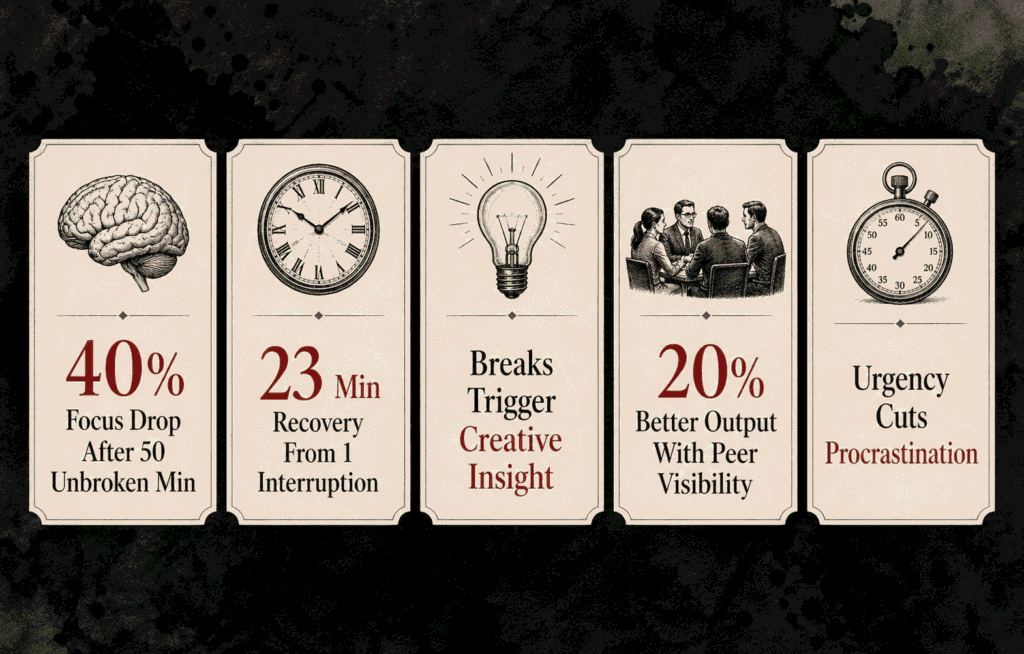
| Short breaks improve focus | Ariga & Lleras, 2011 | Brief mental breaks prevent vigilance decrement in sustained tasks | Strong |
| Interruption recovery = 23 min | Mark et al., 2008 (UC Irvine) | Average time to return to original task after interruption | Strong |
| Time pressure reduces procrastination | Sirois & Pychyl, 2013 (APA) | Mild constraints reduce task-avoidance behaviors | Moderate |
| Breaks activate creative insight | Raichle et al., 2001 (PNAS) | Rest activates DMN associated with creative thinking | Strong |
| Social visibility improves output | Mas & Moretti, 2009 | Workers perform 11–20% better when effort is visible | Strong |
| 25 minutes is optimal duration | Cirillo empirical (1988) | Pragmatic default — individual optimal varies significantly | Anecdotal |
⚠️ Honest note: The specific 25-minute duration has no definitive controlled study proving universal optimality. What is scientifically proven: structured breaks improve attention, time pressure reduces avoidance, and social visibility improves performance. Pomodoro bundles all 3 into one practical system.
Advanced Pomodoro customization: build your personal system
Stack Pomodoros by energy, not by calendar
Your cognitive energy isn’t uniform across the day. Most people have a peak window of 2–4 hours, usually morning. Reserve it exclusively for your hardest, highest-value Pomodoros. Use longer 45-minute sessions.
In post-lunch valleys, drop to 20-minute sessions for easier tasks like email and admin.
The weekly Pomodoro retrospective
Export your data every Friday using the Export button in Settings. Review your weekly session totals and daily averages. Ask 3 questions: What’s working? What keeps interrupting me? What would one additional daily session enable over the next 90 days?
This 15-minute ritual turns raw timer data into actionable system improvement.
Team Pomodoros: synchronized focus blocks
Consider synchronized Pomodoro blocks with your team. Agree on 25-minute windows where everyone is in focus mode, no Slack, no interruptions. Share your names in the leaderboard tab. Hold a 10-minute sync break together.
This creates a team-level focus culture that dramatically reduces the interruption cost that kills individual deep work.
Pairing Pomodoros with task estimation
After 4 weeks of tracking, you’ll have real data on how many Pomodoros different task types actually take, not how many you hoped. If writing a blog post consistently takes 6 Pomodoros, stop scheduling it as a “one morning” task. Block 3 focused hours.
Accurate estimation prevents the calendar-collapse that derails most productivity systems.
Frequently asked questions: Pomodoro timer online (2026)
What is a Pomodoro timer online?
A Pomodoro timer online is a free browser-based productivity tool that automates the Pomodoro Technique: 25-minute focused sprints separated by 5-minute short breaks and a longer break every 4 sessions. Advanced versions like the one at the top of this page include task management, analytics, streaks, leaderboard, focus mode, themes, and data export. No download or account needed.
How many Pomodoros should I do per day?
Research and practice suggest 8–12 Pomodoros per day is a sustainable, high-output workday: roughly 3.3–5 hours of pure focused work. Beginners should start with 4–6 daily sessions and build gradually over 2–3 weeks. Quality of attention within each session matters more than raw count. The analytics tab helps you find your personal sustainable ceiling.
Does the Pomodoro Technique work for ADHD?
Yes. The Pomodoro Technique is one of the most ADHD-compatible productivity methods available. It provides concrete time boundaries, visible progress via the countdown ring, and immediate reward cycles. Many ADHD practitioners recommend 15-minute sessions. The auto-start feature removes friction between sessions, which is critical for ADHD momentum maintenance.
What should I do during Pomodoro breaks?
During 5-minute short breaks: stand up, stretch, get water, look out a window. Avoid all screens — social media and YouTube stimulate rather than rest your brain. During 15–30 minute long breaks: eat, take a short walk, do light exercise, or have a non-work conversation. Real recovery means full cognitive rest, not just a change of stimulus.
Can I use the Pomodoro timer online on mobile?
Yes. The Pomodoro timer is fully mobile-responsive and works in any modern browser on smartphones and tablets. All features including task management, analytics, focus mode, settings, and notifications work on mobile. No app installation required. Grant notification permission and you’ll receive break alerts even when the screen sleeps.
How does the streak tracking work?
The timer saves all data to your browser’s local storage. Your streak increments for each consecutive day you complete at least one Pomodoro session. Missing a full day resets the streak. Data persists across browser sessions automatically. Use the Export function in Settings to back up data across devices.
Is 25 minutes the best Pomodoro session length?
25 minutes is the classic default but not universally optimal. Track your experience over 2 weeks: if sessions feel too short, extend to 35 or 45 minutes. If you feel strained before the ring, shorten to 20. You can adjust durations freely in the Settings tab. Your personal data is more useful than any default.
What happens when I complete 4 Pomodoro sessions?
After completing your 4th consecutive work session, the timer automatically triggers a long break of 15–30 minutes, customizable in Settings. This completes one full Pomodoro cycle. The session counter resets and a new cycle begins. Long breaks allow your brain to consolidate information and restore deeper cognitive resources that short breaks can’t fully replenish.
Your next step takes 60 seconds
You’ve read 4,000 words on the Pomodoro timer online. You understand the brain science, the formulas, the features, the mistakes, and the advanced techniques.
Here’s the only thing that matters now: none of it helps until you press Start.
Scroll back up. Open the timer. Add one task. Set 25 minutes. Press Start. Everything else, the streaks, the analytics, the mastery, follows from that first ring.
📚 References & data sources
- Cirillo, F. (1992). The Pomodoro Technique. FC Garage. pomodorotechnique.com
- Ariga, A., & Lleras, A. (2011). Brief mental “breaks” keep you focused. Cognition, 118(3), 439–443.
- Mark, G., Gudith, D., & Klocke, U. (2008). The cost of interrupted work. CHI 2008. acm.org
- Raichle, M.E. et al. (2001). A default mode of brain function. PNAS, 98(2), 676–682. pnas.org
- Sirois, F., & Pychyl, T. (2013). Procrastination and mood regulation. Social and Personality Psychology Compass, 7(2), 115–127.
- Mas, A., & Moretti, E. (2009). Peers at work. American Economic Review, 99(1), 112–145.
- Asana. (2025). Anatomy of Work Global Index. asana.com
- DeskTime. (2023). The Secret of the 10% Most Productive People. desktime.com